

Administrative data input

Granting Survey Access to 1KA Helpdesk

Protecting user data is one of 1KA's top priorities. Access to data is limited to the author (editor) of the survey and additional co-editors, which are added by the author of the survey.

1KA's helpdesk and the website administrator of www.1KA.si do not have access to surveys and data without the explicit consent of the user.

In case the user requires assistance from 1KA’s administrators, the user must grant temporary access to 1KA's helpdesk (until the issue is resolved). Despite granted access, administrators are still committed to the highest standards of privacy protection, as defined in the Terms of Use.

Each survey has an icon in the top left corner which enables you to grant access to 1KA's helpdesk and administrators. You have to click 'Grant access to help centre'.
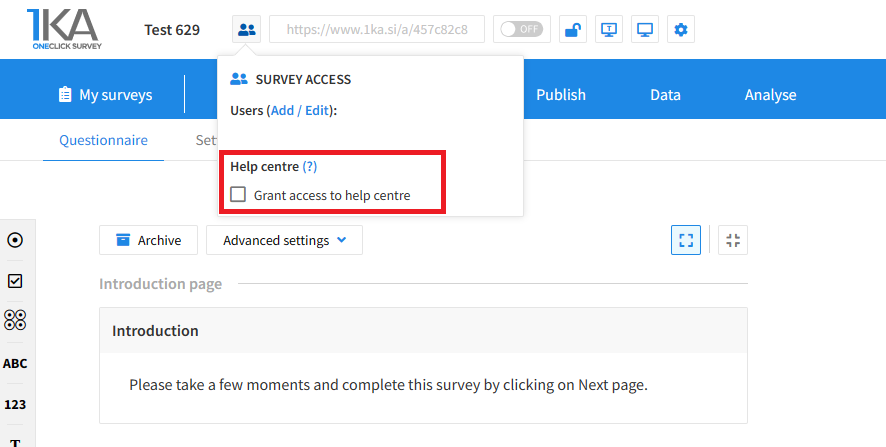
Grant access to help centre
 

The author can add co-editors in the tab 'EDIT' – 'Settings' – 'Editor access'.

Related content

Administrative data input

Entering data that we have gained thorough fieldwork, is a lengthy process. 1KA application allows that this process is shortened by generating an online survey, adapted for rapid data input.

Administrative data input in 1KA application has several advantages. It allows you to:

  • have better control over data enterers, because it recognize them as enterers for each unit;
  • data entry is less time consuming, since it can incorporate massive entry and then we can move through the questionnaire using TAB key and simply insert the values; this way we can avoid burdensome clicking;
  • while typing, you can access to the statistical analysis and the graphic presentations of the data in the 'ANALYSIS' tab.

Data is prepared for export in various formats; we can also export reports with statistical analysis and graphical presentations of individual variables.

Links

<< Back to Advanced Modules

1KA is free to use for basic users



