

 Google Sign In

Settings
Sending Email Invitations
Standard ways of conducting online surveys
Two emails or untracked invitations sent to the entire list of respondents are almost always sufficient, as follows:
- In the first email, you invite all potential respondents in the form "I invite you to complete the survey ...".
- The second email should follow 2-3 days after the first, but no more than a week. In it, you should again address the entire list of potential respondents (both those who have already completed the questionnaire and those who have not yet done so) with the same salutation to the effect: "A few days ago you were invited to complete the survey .... We sincerely thank all those who have responded. For those of you who have not yet responded to the survey, we once again invite you to do so ..."
The two messages are sent to the entire list of potential respondents in the usual way of sending emails, where you send an email invitation with the URL of the survey in your client (Gmail, Yahoo, MS Outlook, Thunderbird, etc.). It is true, however, that there are restrictions that need to be taken into account, as in some places there is a limit on the number of emails sent per day (e.g. Gmail has a limit of 500 addresses for individuals in 2023 when sending via the web application). This can be solved by spreading the sending of your invitations across several days, or by sending from several different email accounts.
Special cases:
When you want to send a large number of invitations (three, four, etc.) or when you have a list containing thousands of people, you most likely need a system to send invitations.
When using the 1KA e-mail system for sending invitations, which is available for users of the 3KA package for individuals and for users of the business packages for groups, the following should be taken into account:
- Using 1KA to send invitations is usually not necessary, especially if there are only a few hundred addresses, as it is quicker and easier to send email invitations from your own email account (Gmail, Yahoo, MS Outlook, Thunderbird ...).
- The system allows tracking the status of the respondent or non-respondent and related reminders to the remaining non-respondents.
- It is worth considering whether we really need a third or fourth e-mail reminder. It has been shown that a third and fourth reminder only minimally increases the participation rate, while complicating and prolonging the data collection phase.
- It should be noted that the use of e-mail addresses for the purposes of the survey is not allowed without the addressee's permission. You may therefore only send survey invitations to addressees who have given their prior consent or whose email addresses have been collected in a related administrative process of an organisation where you have the authority and permission to send email invitations, as it is undeniably clear from the context of the survey that this is a specific internal evaluation of users. It is therefore the user's responsibility to ensure that they do not abuse respondents' privacy by using the 1KA system, e.g. for the purposes of spam invitations or for any other purpose, as also defined in the terms of use and the anti-spam policy.
- If you do not need to track the status of the respondents, we advise you to send the same (non-individualized) survey URL in the invitation, which should also be mentioned in the invitation, e.g. "We guarantee you complete privacy of your answers, so the survey URLs are not individualized...". This helps to increase the response rate, as many respondents are increasingly annoyed by the fact that they receive an individualized URL, knowing that this in principle gives insight into the individual response.
The right to use the 1KA email system and the Terms of Use
The user may obtain the right to use the 1KA invitation system by purchasing a 3KA package for individuals or by purchasing a business package for groups, whereby the 1KA invitation system may only be used with the user's own SMTP server settings. In doing so, the user agrees that in accordance with the terms of use and the anti-spam policy, invitations will only be sent to known recipients who have either previously explicitly agreed to participate in the study, or to recipients where it is clear that this is an evaluation of a group for which the user has administrative responsibilities and data (members of an association, course attendees, subscribers, personal network, etc.)
On 1KA.Arnes.si, a new, redesigned interface for sending email invitations is available. More >>
Some of the functionalities described are only available for users of the 3KA package for individuals, and for users of the business packages for groups.
Related content
Setting a Custom Survey URL
When you create a survey in 1KA, it is assigned a random string of numbers and letters, which then appear in the survey URL; for example www.1ka.si/a/4669.
In the 'PUBLISH' – 'Links' tab, you can click on the 'Create custom URL' button to add a URL that is more engaging and appealing to respondents. You can use a minimum of three characters (č, ć, š, ž, đ characters can not be used). The system distinguishes between upper and lower case letters.
The functionality is available for users of the 2KA and 3KA packages for individuals, and for users of the business packages for groups.
Related content
Granting Survey Access to 1KA Helpdesk
Protecting user data is one of 1KA's top priorities. Access to data is limited to the author (editor) of the survey and additional co-editors, which are added by the author of the survey.
1KA's helpdesk and the website administrator of www.1KA.si do not have access to surveys and data without the explicit consent of the user.
In case the user requires assistance from 1KA’s administrators, the user must grant temporary access to 1KA's helpdesk (until the issue is resolved). Despite granted access, administrators are still committed to the highest standards of privacy protection, as defined in the Terms of Use.
Each survey has an icon in the top left corner which enables you to grant access to 1KA's helpdesk and administrators. You have to click 'Grant access to help centre'.
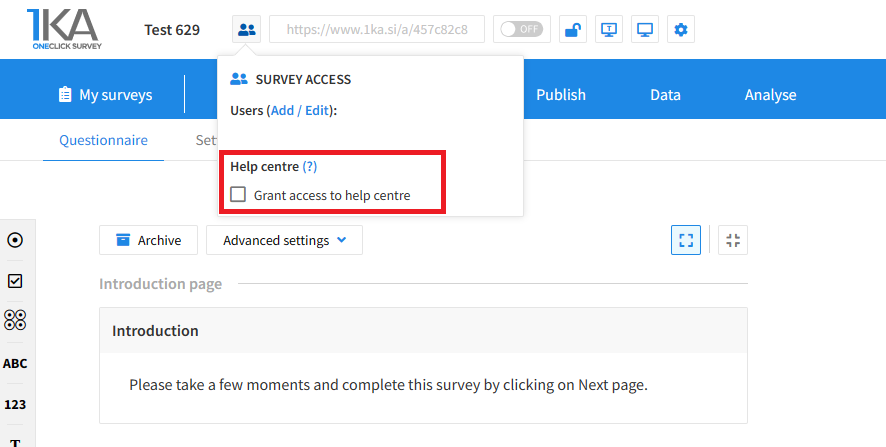
The author can add co-editors in the tab 'EDIT' – 'Settings' – 'Editor access'.
Related content
Copying the Survey
The video guide shows how to copy an existing survey in 1KA.
Each survey we previously created or have access to edit can be copied and reused to collect data.
Adding Additional Survey Editors
The video tutorial shows how to share a survey with other editors in 1KA.
Recommendations for Reducing Non-Response Rates
There are 10 simple ways to reduce the non-response rate:
1. Recruit from a variety of sources. Don't just send invitations via email - post the survey in different online communities (forums, social networks, etc.).
2. Personalise the email invitations. Personalised messages increase the response rate by at least 5%, sometimes even more. So, address invitations to "Ms./Mr. Smith", not just to "Dear Ms./Mr."
3. Keep the email invitation short and simple. In addition to the link to the online survey, don't forget to point out:
- who you are;
- what the survey means for each individual;
- the length of the survey (especially if it is short, but don't be misleading, as respondents are more open to completing longer surveys if they know what to expect);
- the anonymity of the survey.
4. Keep the first page of the survey simple and attractive. Make it motivating for respondents. Do not put instructions on it, as research shows that respondents are reluctant to read long instructions on the first page.
5. However - highlight how you will use the answers. Write this down on the first page. People prefer to give information on the internet if they are familiar with how it will be used. So emphasise anonymity and the confidentiality of the information, or plans to share it with others.
6. Don't forget to send email reminders. After a certain period of time, send a second invitation to people who have not responded to the survey. You can do this by sending a thank you to those who have already responded and encouraging those who have not yet done so. However, it is better not to send more than two reminders and, in particular, to remove the e-mail addresses of those who no longer wish to be contacted.
7. Consider offering incentives - gifts, rewards, etc. Studies show that you don't need big or expensive incentives to increase response rates. Even small gifts can help to increase response rates.
8. Some people simply want to share their opinion. Many people will respond to a survey just because they want to share their opinion, not because of the rewards. So consider making the prize optional - e.g. hold a prize draw.
9. Make strategic use of graphics and other online opportunities. Generally, surveys do not need graphics; they can sometimes even be distracting or influence the answers. In some cases, however, graphics can increase response rates (e.g. a link or picture of the reward, etc.).
10. Publicise the results of the survey. Respondents are interested in the results of the survey and publishing them will help motivate them to complete the survey.
Related content




