

Diagnostic

Measurement and Time Limitations for Responses

For each variable, you can limit the time available for entering a response. This can be done in the 'Advanced' tab in the question settings (in the 'EDIT' – 'Questionnaire' tab), where you can select 'Time limit for answering (Timer)' and set the display time for that question. Only one timer can be set for each page. When the time is up, the survey will be redirected to the next page automatically, regardless of whether there are other questions that do not have a timer on the previous page. We therefore recommend that if a timer is set, you add a page break after each question.

Pending the next application update, it is currently not possible to utilize the timer feature in cases where the timed page is followed by a page with a question that's not visible to all respondents (eg. due to group randomization or other IF conditions). Depending on the individual survey design and methodological needs, consecutive timed pages with separate conditions may instead be interspersed with pages visible to all respondents (in cases where question order is not imperative), or all timed questions within conditions can be grouped on one page (in cases where each respondent is only shown one question out of a pool of multiple questions).

If you wish to measure the answering time for each question, you must also create a separate page for each question, since time is only measured for each page. You can enable paradata in the 'DATA' – 'Browse' tab ('+ Show columns' - 'Respondent paradata') to record, in addition to the survey data, the date and time at which the respondent arrived at a particular page of the questionnaire.

In the table with the respondent units, we then have the date and exact time of completion according to the individual pages of the survey:

  • Date:
    • Begin: the exact date and time (hours, minutes and seconds) when the respondent opened the survey page (click on the URL of the link to open the survey);
    • End: The last time the respondent was active on the survey, excluding the outro page;
  • Page 1: date_1: Exact time when the respondent clicked on the "Next page" button on page 1;
  • Page 2: date_2: Exact time when the respondent clicked on "Next page" button on page 2;
  • Page n: date_n (n = number of pages): Exact time when the respondent clicked on the "Last page" button on page n;
  • The time of the outro page (end of the survey) is not visible.

The average page times are listed in the 'TEST' - 'Duration' - 'Actual time'.
 

Related content

Satisficing in Surveys

Respondents' behaviour during the survey is influenced by various factors: the complexity of the questionnaire, the respondent's ability and the respondent's motivation. In long surveys, respondents often become tired, disinterested, impatient and distracted when completing the survey. This can lead to the respondent starting to answer according to the satisficing theory. Satisficing is an alternative form of behaviour of respondents who lack engagement but still participate in the survey for various reasons (e.g. contract, rewards, feelings of shame, habit, curiosity, etc.).

Whether respondents are completing the survey on a satisficing basis can be identified through various response patterns: the choice of the first answer, the choice of the middle values, the choice of the last answer, random choices, the choice of the final and first values for matrix questions (tables) and the use of the answer 'Don't know', the time of completion of the survey, etc.

Approaches to Reducing Satisficing in Surveys

1. Before data collection:

  • If possible, keep the questionnaire short, keep the questions simple and occasionally include questions where respondents are asked to explain their answer. Put the more important questions at the beginning.
  • Motivation of respondents can be increased by emphasising the importance of the study.
  • We make the survey easier for respondents by reducing the complexity of the wording of questions, avoiding questions about events that would be harder for respondents to recall, rewording complex questions into multiple questions, naming all answers.
  • The satisficing effect can also be reduced by randomising the answers, avoiding table-type questions and questions with non-content answers.

2. During data collection:

  • At the time of data collection, we can monitor the time taken to complete the survey, which, in the event that the survey is completed significantly faster than expected, indicates the possibility of satisficing-based completion. It should be borne in mind that fast completion is not necessarily an indicator of satisficing.

3. After collecting data:

  • After the data collection period, we can remove answers or even whole units from the analysis (or use data insertion methods) where we observe satisficing to improve the quality of the data.

Granting Survey Access to 1KA Helpdesk

Protecting user data is one of 1KA's top priorities. Access to data is limited to the author (editor) of the survey and additional co-editors, which are added by the author of the survey.

1KA's helpdesk and the website administrator of www.1KA.si do not have access to surveys and data without the explicit consent of the user.

In case the user requires assistance from 1KA’s administrators, the user must grant temporary access to 1KA's helpdesk (until the issue is resolved). Despite granted access, administrators are still committed to the highest standards of privacy protection, as defined in the Terms of Use.

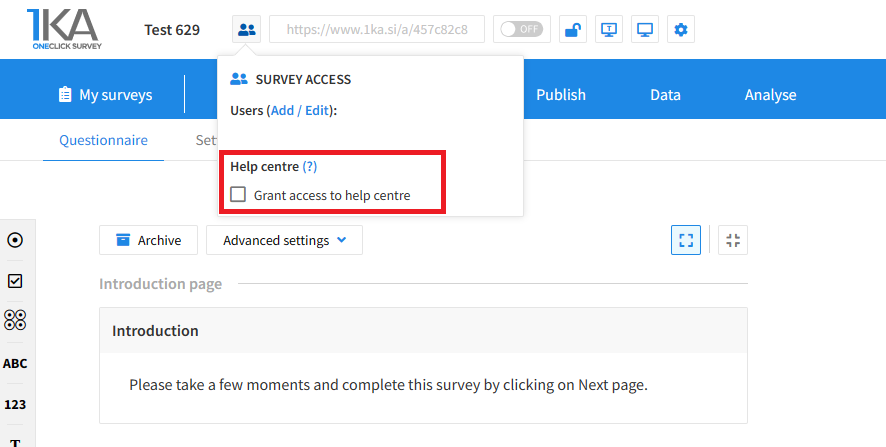
Each survey has an icon in the top left corner which enables you to grant access to 1KA's helpdesk and administrators. You have to click 'Grant access to help centre'.

Grant access to help centre
 

The author can add co-editors in the tab 'EDIT' – 'Settings' – 'Editor access'.

Related content

Survey Testing

The video guide shows how to test the survey you created in the One Click Survey application.

Testing before the final publication is a very important step in making a good questionnaire. One Click Survey automatically recognizes the shortcomings of your questionnaire and estimates its duration.


The link to the mentioned video Comments.

1KA is free to use for basic users



