

Moje ankete

GDPR and Data Collection

GDPR is the European General Data Protection Regulation (GDPR), which became uniformly effective in all Member States on May 25, 2018. It is a set of regulations designed to protect EU citizens' personal data and enforces rules on data privacy and how organizations collect, store and use personal data.

Among other things, GDPR stipulates that the collection of personal data can only start once the researcher (the author of the survey) has received the individual's explicit consent to the collection itself.

The individual (respondent) must also be clearly informed what data will be collected and for what purpose. When collecting personal and survey data, we follow the principle of data minimisation, i.e. we collect only the data we need to fulfil the purpose of the survey. This data may not be used for any other purpose of which the respondent has not been informed and has not given their explicit consent. This means that the author of the survey may only use the data obtained for the purpose of the survey and not pass it on to any third parties. Nor may the data be combined with other data in their possession.

Consent may be withdrawn at any time by the individual (respondent) and the authorisation to process the data will cease. The respondent has the right to erasure (right to be forgotten), modification and access to the data. On this basis, the respondent may request the author of the survey to delete or modify their personal or survey data and to give them access to the data collected.

The full regulation is available here >>
 

Rights of Respondents and Responsibilities of Survey Editors Within the GDPR

The data controller, who in the context of the GDPR is the author or editor of the survey, determines how personal data is processed, and the data processor processes personal data on behalf of the controller. Data subjects are the persons whose personal data is collected or used.

Individuals’ rights (respondents)

  • Right of access: the respondent may request to see what personal data is collected with the survey, for what purpose, for how long, etc. and obtain a copy of this information (Article 15).
  • Right to rectification: the respondent may request a change or correction of personal data in the survey (Article 16).
  • Right of erasure: the respondent has the right to delete data (“Right to be forgotten”) under certain conditions (Article 17).

Responsibility of editors

Authors or editors of surveys (1KA account holders) are the so-called data controllers that collect data; 1KA is the processor of this data. The editor or survey author is the owner of the survey, which is responsible for all information and data generated and collected using the 1KA tool. At the same time, they are also responsible for the fullfilment of all the requests made by respondents for their surveys (request for erasure, access, rectification of personal or survey data).

Enabling Two-Factor Authentication in 1KA

You can enable two-factor authentication to log in to 1KA, which means that upon logging in, you will also need to enter a special code that is obtained through a separate code-generating application.

To set up two-factor authentication, follow these steps:

  1. Log in to 1KA and click on your username in the upper right corner, then click on 'Edit profile'.
  2. At the bottom of the settings, make sure the box next to the "Two-factor authentication" option is checked.
  3. Download the Google Authenticator app (Google Play for Android or App Store for iOS) on your smartphone.
  4. Use the Google authenticator application to scan the QR code or manually enter the code that appears here in your authenticator.
  5. Once you save the settings, this code will no longer be available as the code is constantly changing.
  6. While two-factor authentication is turned on, you must always enter your 1KA password and code from the authenticator application when signing in.
  7. To turn off the two-factor authentication, you must also enter the code obtained from the Google Authenticator application.


Related content

Granting Survey Access to 1KA Helpdesk

Protecting user data is one of 1KA's top priorities. Access to data is limited to the author (editor) of the survey and additional co-editors, which are added by the author of the survey.

1KA's helpdesk and the website administrator of www.1KA.si do not have access to surveys and data without the explicit consent of the user.

In case the user requires assistance from 1KA’s administrators, the user must grant temporary access to 1KA's helpdesk (until the issue is resolved). Despite granted access, administrators are still committed to the highest standards of privacy protection, as defined in the Terms of Use.

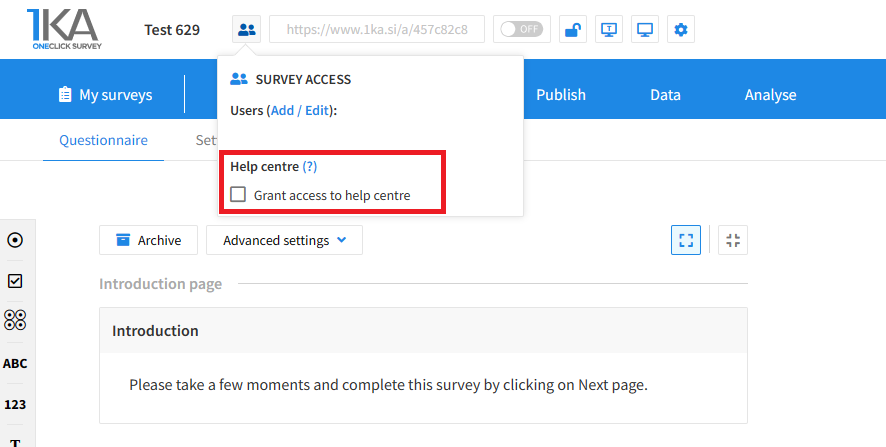
Each survey has an icon in the top left corner which enables you to grant access to 1KA's helpdesk and administrators. You have to click 'Grant access to help centre'.

Grant access to help centre
 

The author can add co-editors in the tab 'EDIT' – 'Settings' – 'Editor access'.

Related content

GDPR Survey Settings

The video guide shows how to create a questionnaire in 1KA, which will include GDPR settings, in three steps. In the survey settings, we can indicate whether personal data is collected in our survey, and we can also use the 1KA template for respondents' consent of personal data collection.

1KA is free to use for basic users



