

Paradata

Using the IP Address and Cookies to Control Duplicate Entries

Non-list based web surveys do not enable unique identifiers, which would enable us to control duplicate entries. Therefore, we have two alternatives, IP address and cookies, however each with certain limitations.

COOKIES

A cookie is a small text file sent from the server hosting the web questionnaire and then stored on respondent devices. Next time the respondent visits this same web questionnaire, the 1KA application recognizes this unit, which can be used to prevent repeated access or to enable proper continuation from eventual pausing or breakoff.

1KA application enables a variety of duration options in terms of cookies, which can be also accessed through the 'EDIT' - 'Settings' - 'Respondent Access' - 'Completion options'When you select ‘The same respondent can complete the survey only once‘ under the ‘Multiple responses‘ option, you have following options for cookie storage duration: 

  • Until the end of the browser session‘ - where the cookie will be deleted as soon as the respondent closes their browser (Internet Explorer, Mozilla Firefox, Opera,...); so if the respondent returns within the same session, they can make further corrections. Caution: if a second respondent enters in the same session after the first respondent, the cookie will still be from the first respondent and there will be problems!;
  • 1 hour‘ - means that the cookie will be deleted after one hour from the first time the respondent clicked on the survey URL. The same warning as above (browser session) applies;
  • 1 month‘ - the cookie will be deleted after one month since the respondent first clicked on the survey. The same warning as above (browser session) applies.

You can find more about cookie settings and options for future continuation of the survey fulfilment in the Settings for respondent access: cookies and passwords manual.

Limitation: The problem with cookies is that they are tied to the browser, which means that respondents using another browser, other devices or users deleting the cookie can complete the survey again. Cookies face serious problems due to increasing ethical and legal restrictions, as well as because some users decide to block them. For these reasons, cookies serve poorly as a replacement for the ID code.

IP ADDRESS

The IP address is a number assigned to all devices logged into the network, including the respondent’s device. 1KA application enables you to block duplication of IP addresses, which can prevent the same person from repeatedly responding to your survey.

This functionality can be accessed under the 'EDIT' - 'Settings' - 'Respondent access' - 'IP recognition' tab. In the ‘IP recognition' category select the desired option - for editing responses during completion and multiple responses.

Limitation: The problem may occur in the case of dynamic IP addresses (dynamic IP address for the same device is changed when disconnected and restored) or in cases where the number of devices on the same network has the same IP address (eg. in organizations).

Despite these limitations, the use of IP blockage may prevent at least some of the simpler frauds like fake responses or server attacks coming from a single device.

In general, we do not recommend using IPs and cookies for restricting access to the survey, because they can cause various expected and unexpected problems. In the default settings of the 1KA application these options are usually turned off. Still, in some specific situations, they can be useful, particularly if we know that in our target population none of the above problems emerges.

The best way to prevent duplicate entries is to use individual codes. In the 'PUBLISH' - 'Invitations' tab, you can set individual codes through the interface for sending email invitations, which is available to users of the private package 3KA. Usually, this code is then used in the email invitation, either automatically (in the URL of the survey) and does not need to be entered by the respondent. However, we can require the code to be entered manually. Similarly, the code can be sent in other ways, e.g., in a letter, and respondents can retype it. The generation and use of individual codes is described here.
Survey Data, Paradata, Identifiers and System Variables

In the 'DATA' - 'Browse' tab, the following data for valid units is displayed by default: status, status details and respondents' answers.

Status

  • Status: the final status of the units.

Status details

  • Empty: shows if the questionnaire is empty (the respondent merely clicked through the survey without answering);
  • Recnum: consecutive record (entry) number;
  • Date: date on which the survey was filled out.

Respondents' answers

  • Respondents' answers (survey data) for valid units.

If you want to see the actual responses in addition to the numerical values of the responses, click on 'Show columns' and tick the 'Response labels' option.

Additional data

If the option 'All units' is selected when browsing the data, or if some units have an email invitation, the following field will automatically appear:

  • Relevance: shows whether an individual unit is valid, where units with statuses 5 and 6 (i.e. fully or partially completed questionnaires) are considered as valid.

In special cases, you can also enable the display of the following information by selecting the relevant check boxes in 'Show columns':

  • Record number, which is generated automatically;
  • Quick view survey: shortcut for viewing an individual respondent's survey answers on one page.

If you have used automatic test entries, the 'Test' column will also automatically appear when viewing the data, indicating whether the unit is a test entry.

Paradata

Paradata is only available for users of the 2KA and 3KA packages for individuals, and for users of the business packages for groups. By selecting 'Respondent paradata' under 'Show columns', the following information is displayed:

  • Date begin: exact date and time (hours, minutes and seconds) when the respondent arrived at the survey homepage (click on the URL of the link to complete the survey);
  • Date end: last time the respondent was active on the survey, excluding the final page;
  • Page 1: exact time when the respondent clicked on "Next page" on page 1;
  • Page 2: exact time when the respondent clicked on "Next page" on page 2;
  • Page n: exact time when the respondent clicked on "Last page" on the n-th page of the survey, where n = the total number of pages in the survey, excluding the outro page;
  • Browser used by the respondent;
  • Browser version used by the respondent;
  • Operating system used by the respondent;
  • Device used by the respondent (PC, phone, tablet);
  • Referrer: the website from which the respondent accessed the survey (redirect);
  • Language: the language in which the respondent answered the survey (in the case of multilingual surveys).

The paradata is shown in the data table on the right (the last columns of the table). If some of the data isn't visible, select the 'All' option from the 'Questions per page' dropdown above the data table on the right hand side.

You can turn off the recording and display of paradata in the 'EDIT' - 'Settings' - 'Paradata' tab, and then no paradata will be recorded in 1KA - not even the timing (response dates) for individual pages. You can turn off the recording of the respondent's browser, the respondent's referrer (redirects) and the dates of answering the questions. More >>

Identifiers

Identifiers are data imported and edited in the 'PUBLISH' - 'Invitations' tab, which is only available to users of the 3KA package for individuals, and for users of the business packages for groups.

Identifiers usually include the name, last name, email, address, etc. For privacy reasons, this information cannot be displayed at the same time as the survey data in surveys, but is displayed separately. With the prior consent of the participants, a common overview, analysis and export is only possible in the Form survey type (one-page survey), where we usually collect registration data, but not survey opinions.

Identifiers are among the system variables that can be used (called) in email communication, i.e. in notifications and sending email invitations. At the same time identifiers allow the identification of each unit. Of course, when editing the questionnaire, in addition to the identifiers, any variable can be marked as a system variable (when editing a question, select the 'Advanced' tab and choose the 'System Variable' option), which allows its use in email communication.

It is not possible to display respondents' IP numbers in the data, as we do not track them and record them separately from the survey data, as defined in our Privacy Policy.


Some of the functionalities described are only available for users of the 2KA and 3KA packages for individuals, and for users of the business packages for groups.


Related content

Granting Survey Access to 1KA Helpdesk

Protecting user data is one of 1KA's top priorities. Access to data is limited to the author (editor) of the survey and additional co-editors, which are added by the author of the survey.

1KA's helpdesk and the website administrator of www.1KA.si do not have access to surveys and data without the explicit consent of the user.

In case the user requires assistance from 1KA’s administrators, the user must grant temporary access to 1KA's helpdesk (until the issue is resolved). Despite granted access, administrators are still committed to the highest standards of privacy protection, as defined in the Terms of Use.

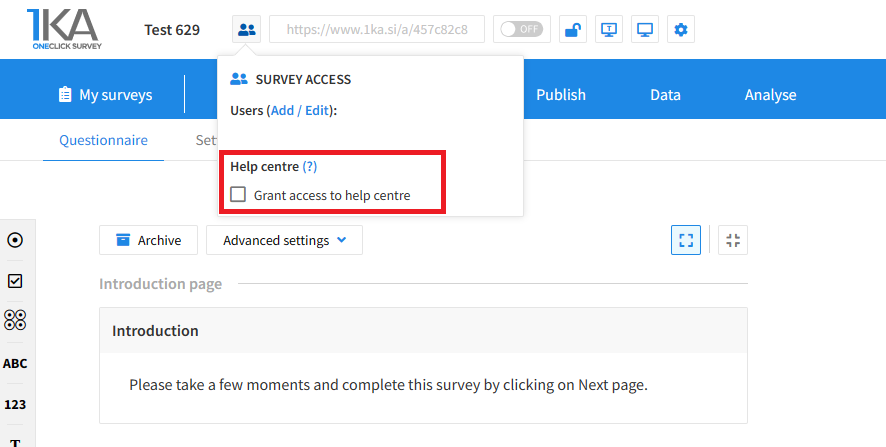
Each survey has an icon in the top left corner which enables you to grant access to 1KA's helpdesk and administrators. You have to click 'Grant access to help centre'.

Grant access to help centre
 

The author can add co-editors in the tab 'EDIT' – 'Settings' – 'Editor access'.

Related content

1KA is free to use for basic users



