

 Google Sign In

My Surveys
Organizing surveys into folders
You can organise the list of all the surveys you have created in the 'My Surveys' directory into folders, which is particularly useful for users who have a large number of surveys.
You can show or hide folders by clicking on the 'Folders' button on the right.

A list of folders appears on the left, where you can create new subfolders by clicking on the three dots. Surveys that you don't put in any of the folders are in the 'All my surveys' folder, which is the first one in the folder list. The other folders are in alphabetical order.

You can rename or delete folders. If you delete a survey folder, the surveys in the folder will not be deleted, they will just be moved to the 'All my surveys' folder.
You can also move (click and drag) any folder into another folder. In the same way, you can also move individual surveys between folders, or you can select a folder for each survey in the 'EDIT' - 'Settings' tab, where you tick the 'Save survey into folder' option and select a folder from the drop-down list.

The functionality is purely for administrative purposes (to help organize the overview of surveys) and does not affect the surveys themselves.
Related content
Principles of 1KA Public Library Use
1. What are the restrictions on the use of questionnaires in the 1KA Public Library? Can anyone copy and use the whole questionnaire, individual parts or questions?
The questions in the public library are in principle intended for non-commercial use by all registered users of 1KA, but it is advisable to check before use if we have the underlying source, or if there are any specific restrictions on use. As a general rule, if the underlying source does not indicate any specific restrictions, the principle of "Fair use" will apply.
The 1KA website provides the questionnaires and individual questions as examples of good practice and established measurement instruments. For all questionnaires, in line with scientific practice, the sources from which the questionnaires are derived are cited in the foreword. It is also specifically mentioned if the source has any explicit restrictions or copyright protection. If the source of the questionnaire does not explicitly mention any restrictions, the questionnaire may be used for all purposes.
Users are also expected to cite questionnaires or parts of questionnaires taken from a public library appropriately.
For commercial use, rights should be further checked with the original source, which is recommended otherwise as well.
2. What does the Fair Use Principle mean?
The “Fair use” principle allows the use, copying and reproduction of copyrighted works for educational, study or research purposes, except where expressly restricted. In any case, the author and sources must be properly acknowledged.
3. How should users cite the questionnaire that they have obtained from the 1KA public library?
In general, the user is expected to explicitly cite the underlying source so that everyone can identify the author and the location of access to the source. The user may cite the source in the same way as the sources are listed in the 1KA Public Library - whether using the whole questionnaire or just a single question. The Faculty of Social Sciences uses the APA standard for citing sources. However, we also recommend checking with the copyright owner to see if they have specific instructions on how to cite sources.
Example of citing the original 1KA questionnaire:
1KA. 2015. Membership Form. Retrieved from https://www.1ka.si/a/47855 (August 2023).
Example of citing a questionnaire from the Data Archive:
Hafner Fink, Mitja, Brina Malnar, Slavko Kurdija, Samo Uhan and Janez Štebe. Slovenia, Ljubljana: University of Ljubljana, Centre for Public Opinion Research and Mass Communications [production], 2013. Slovenia, Ljubljana: University of Ljubljana, Social Science Data Archive [distribution], 2014. Retrieved from http://www.adp.fdv.uni-lj.si/opisi/sjm13 (August 2023).
Example of citing a questionnaire from a scientific publication:
Diener, Ed, Robert A. Emmons, Randy J. Larsen, & Sharon Griffin. 1985. The Satisfaction with Life Scale. Journal of Personality Assessment 49(1): 71-75.
Example of citing a questionnaire from the web:
Ninamedia. 2015. Vox populi. Retrieved from http://www.ninamedia.si/arhiv.php (August 2023).
4. Is 1KA legally responsible for using questionnaires from another organisation that does not cite or incorrectly cites the sources of the questionnaire?
This is a very complex area from a legal point of view. If another organisation were to submit questions without any copyright information, then most of the liability would have to be shouldered by that other organisation. In any case, the copyright owner of the questionnaire could sue anyone who did not properly cite their copyright work.
It should also be pointed out that the legal treatment of intellectual property varies from country to country. The intellectual property regime of the measurement instruments themselves and the results they produce is also unclear. We therefore advise that whenever you are in a dilemma about the use of a foreign work, you should check with the copyright owner about the use.
Related content
Granting Survey Access to 1KA Helpdesk
Protecting user data is one of 1KA's top priorities. Access to data is limited to the author (editor) of the survey and additional co-editors, which are added by the author of the survey.
1KA's helpdesk and the website administrator of www.1KA.si do not have access to surveys and data without the explicit consent of the user.
In case the user requires assistance from 1KA’s administrators, the user must grant temporary access to 1KA's helpdesk (until the issue is resolved). Despite granted access, administrators are still committed to the highest standards of privacy protection, as defined in the Terms of Use.
Each survey has an icon in the top left corner which enables you to grant access to 1KA's helpdesk and administrators. You have to click 'Grant access to help centre'.
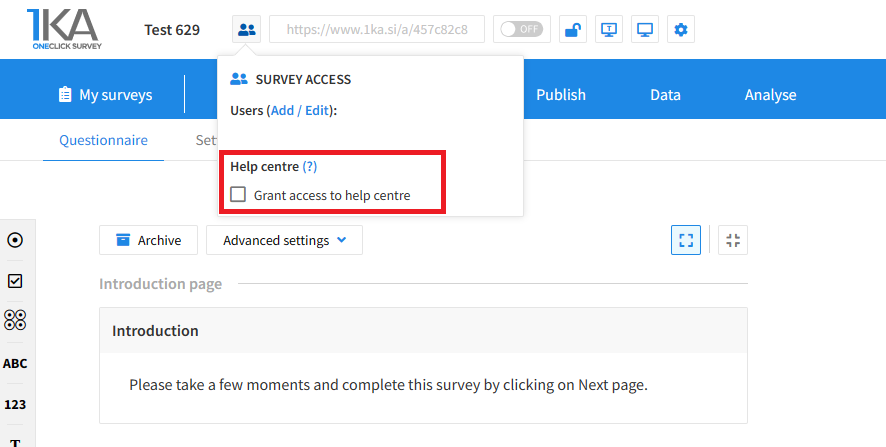
The author can add co-editors in the tab 'EDIT' – 'Settings' – 'Editor access'.
Related content
Importing Questions
This video shows how to import questions from a questionnaire, we have already created in another text editing program, into One Click Survey.
Exporting Questionnaire and Data to PDF and Word
The video guide shows how to use the 1KA application to export the questionnaire and respondents’ answers to PDF or Word, and how to change the PDF and Word export settings.
Library
The video guide shows how to use the survey library, and how to use the questions library in 1KA.
When using the 1KA public library, please follow the Principles of 1KA public library use.
Exporting Data to SPSS and Excel
The video guide shows how to filter and export data to SPSS, Excel (XLS and CSV), and text file (ASCII) in 1KA.
When exporting data we can specify additional export criteria, e.g. statuses (relevant/irrelevant units), sets of variables, conditions, and dates.
GDPR Settings for Editors
The video guide shows how to edit your GDPR profile in 1KA, which will apply to all your surveys. All users have a GDPR tab with various settings and options that apply to all user surveys.




